Note before you begin: If you are having trouble viewing these lab instructions, I recommend using Firefox on a desktop computer or laptop (not mobile device)

Objectives

The objective of this lab is to design a DSP system in MATLAB that correctly detects the first two tones of a DTMF sequence.
pic

Instructions

This lab is a continuation of DSP Lab 4: DTMF tone and song generator.

In this lab you will write a MATLAB function called decodeDTMF, which will decode the first two tones of a DTMF sequence. The input to this function is a DTMF signal which may contain one to several tones of different time durations. The signal may be noisy. The signal may have periods of silence before and/or after the tones. The function decodeDTMF you are to create is specified as follows:

first_two_digits = decodeDTMF(file_path)

Here file_path is the file path to the input signal. The output of this function first_two_digits is an array of two integers containing the first two decoded DTMF digits in the order they appear.

Some important considerations and assumptions:

Decoding DTMF tones

To assit you, below is a list of four files containing known DTMF tones. Download these files and use them to test and develop your function.

File link Actual DTMF digits Expected output of decodeDTMF
File_Test_1.wav 2, 7 2, 7
File_Test_2.wav 4, 0, 7, 8 4, 0
File_Test_3.wav 9 9
File_Test_4.wav (noise) Error: "No signal detected!"

What to turn in

You will submitting the following deliverables to Blackboard:

  1. A PDF containing the table below (completed and correct)
  2. Your function decodeDTMF published and saved as a PDF. Your MATLAB code should be clear, logical, organized, and well-commented for ease of reading. Be sure all other functions you write for this assignment are local to this function. You should only publish one m-file.

In-class demonstration

To earn full credit, I will randomly choose one of the DTMF tone files below for you to demonstrate that your function correctly decodes the file and returns the proper decoded values. The date for this in-class demonstration is posted to Blackboard.

Please complete and turn in the table below (saved as PDF)
File link Output of decodeDTMF
File01.wav
File02.wav
File03.wav
File04.wav
File05.wav
File06.wav
File07.wav
File08.wav

Hints and tips

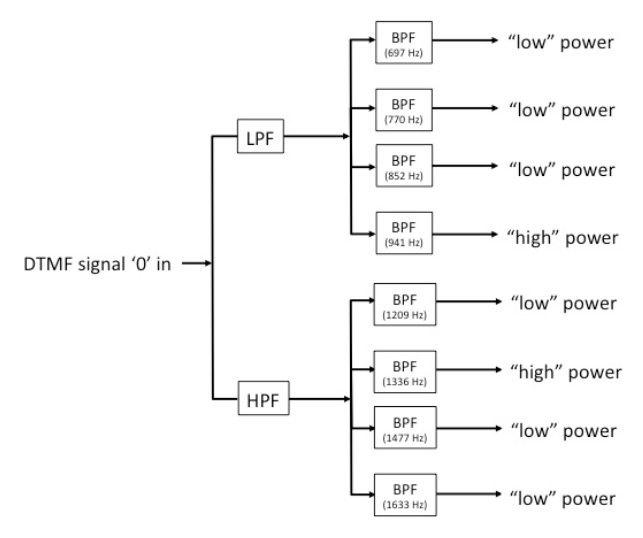
  1. An effective way for determining a tone is create a bank of filters as shown below. In this figure, as an example, it shows a "0" signal entering the filter bank. Note that the bandpass filters (BPFs) associated with the 941 Hz and 1336 Hz tones provide the largest outputs.
  2. The DTMF signal will usually begin and end with a period of silence. In addition, each DTMF digit in the sequence is separated by silences. So use silence to your advantage. For example, you can find create a function called FindSignalStart as follows:

    [y,index]=FindSignalStart(x)

    Here, x is the input vector samples. The output y is the same as the input, but with the first silent samples (which may contain some background noise) removed. The output index is the index number in the input vector where the sound actually begins. The MATLAB function find may prove useful in determining the value of the index that is returned.
  3. The DTMF signal can have any amplitude, so it is recommended you normalize the signal (perhaps, after filtering out some noise) so the data falls within the range [-1, +1].
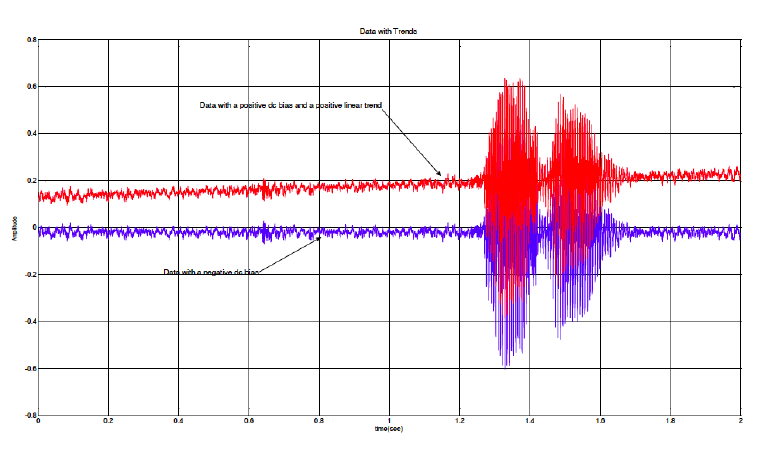
  4. Sometimes data collected has a DC bias, and/or linear trend that cause errors in DSP algorithms. Shown is below is an example of some data that contains these trends (red curve exhibits positive bias, blue curve exhibits negative bias). When processing DTMF signals (or audio signals in general), it is generally a good idea to eliminate the mean (DC) value and any linear trend. This process is called "detrending", and can be accomplished in MATLAB using the detrend function.