Like many other programming languages, Python has a way to split your code into many files. The advantages of this
include: increased organization, facilitating code reuse, sharing code between projects, and splitting coding responsibilities
between programmers. In the world of Python, project organization is done through the use of modules and packages.
From
The Python Tutorial - Modules and
learningpython.org - Modules and Packages:
- A module is a Python file with the .py extension, which define and implement a set of functions and statements.
Modules are imported from other modules using the import command.
- A package is a collection (directory) of modules and other packages.
Packages structure Python's module namespace by using the "dotted module name" notation (e.g.
the module name A.B designates a submodule named B in a package named A.)
Two examples of a project containing a package of modules is presented below.
My main reference, which really helped me understand this stuff is
Python 201: Creating Modules and Packages.
Method 1: Regular package (works with all versions of Python)
The figure above presents the file structure for the main program and the package. The package is the mymath directory along with the modules and folders contained within. The main program main.py is located in the module's parent folder.
Download this example
here.
Or, as an alternative, if you are more comfortable at looking at the fire structure using the shell...
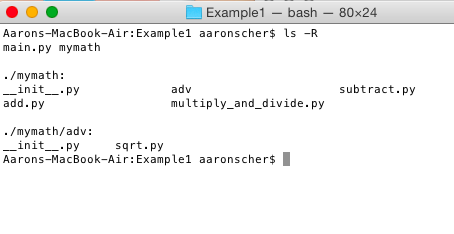 File structure for the main program and the package viewed in the Terminal
#!/usr/bin/
import mymath #I only need to call one simple import, and the __init__.py file in the mymath directory will hand all the rest of the importing stuff.
print(mymath.add(4,5))
print (mymath.squareroot(-1))
#Just for fun, let's add up two variables a and b, instead of 'hardcoded' numbers.
a=5
b=4
print('{} * {} = '.format(a,b) + str(mymath.multiply(a,b)))
#Now to divide it up!
print(mymath.divideItUp(2,2))
#Just for fun...
# Import built-in module mymath and check out what is in the directory
mymath_content = dir(mymath)
print('\nSo, what is in the mymath directory anyway?\n\n' + str(mymath_content)+'\n')
#----------------------------------------------------------------------
def subtract(x, y):
    """"""
    return x - y
#----------------------------------------------------------------------
def add(x, y):
    """"""
    return x + y
#----------------------------------------------------------------------
def multiply(x, y):
    """"""
    return x * y
#----------------------------------------------------------------------
def division(x, y):
    """"""
    return x / y
print("This is just a test... Now you know __init__.py in the mymath directory has executed!")
#To make all of your functions available when you've imported mymath, you need to put explicit import statements in __init__.py as follows:
from mymath.add import add
from mymath.multiply_and_divide import multiply
from mymath.multiply_and_divide import division as divideItUp
from mymath.subtract import subtract
from mymath.adv.sqrt import squareroot
All directories in a regular package must contain a file with the name "__init__.py".
The code in __init__.py runs the first time you import any module from that directory.
These files can be blank. In the example above I put some package level initialization code
to make the import process in my main code a breeze.
import cmath #Import cmath (i.e. complex math) standard library
#----------------------------------------------------------------------
def squareroot(n):
    """"""
    return cmath.sqrt(n)
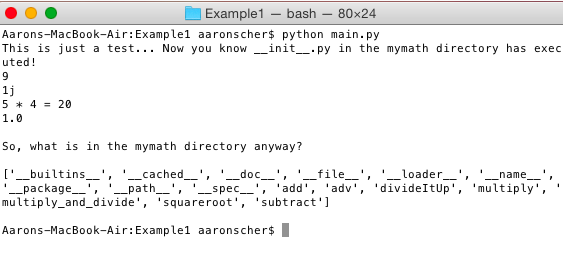 Running Python script from Terminal (Note: working directory in Terminal is the Example1 folder where main.py lives)
Method 2: Namespace package - No __init__.py file! (works starting with Python version 3.4)
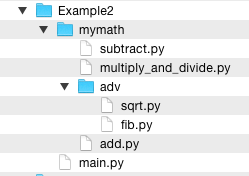
The figure above presents the file structure for the main program and the package. The package is the mymath directory along with the modules and folders contained within. The main program main.py is located in the module's parent folder.
Starting with Python 3.4, you don't need to include __init__.py files to create a package.
A package created without __init__.py files is considered a "namespace package".
Download this example
here.
#!/usr/bin/
#Below I demonstrate how to import modules and functions using different call types:
import mymath.add #Import add.py source file as a module. I can call the defined function 'add' in the module using the call 'mymat.add.add'
from mymath.adv.sqrt import squareroot #Here is use an import using a From...Import statement.
#Here I import the function 'squareroot' from the module mymath.adv.sqrt. This statement does not import the entire module sqrt into the current namespace; it just introduces the item  squareroot from the module sqrt into the global symbol table of the importing module.
from mymath.multiply_and_divide import multiply # Another import using a From...Import statement.
from mymath.multiply_and_divide import division as divideItUp # Another import using a From...Import statement.
#Note that this is the first instance of 'divideItUp'... I basically inported the function division and then renamed it, all with one line of code!
#Ok, now that we got all the importing out of the way...Let the main script begin!
print(mymath.add.add(4,5)) #Since I imported add.py source file using 'mymath.add' statement, I need to call the 'add' functioned using the call 'mymath.add.add'
print(squareroot(-1))#I can call my 'squarroot' function directly usince I imported this using From..Import statement at the beginning of the code
#Just for fun, let's add up two variables a and b, instead of 'hardcoded' numbers.
a=5
b=4
print('{} * {} = '.format(a,b) + str(multiply(a,b)))
#Now to divide it up!
print(divideItUp(2,2))
#An aside... A quick look at the dir command:
# Import built-in module cmath and check out what is in the directory
import cmath
math_content = dir(cmath)
print('\nSo, what is in the cmath directory anyway?\n\n' + str(math_content))
# Import built-in module mymath and check out what is in the directory
mymath_content = dir(mymath)
print('\nSo, what is in the mymath directory anyway?\n\n' + str(mymath_content)+'\n')
#References:
#http://www.tutorialspoint.com/python/python_modules.htm
#https://en.wikibooks.org/wiki/Python_Programming/Modules
#http://www.blog.pythonlibrary.org/2012/07/08/python-201-creating-modules-and-packages/
The other modules (subtract.py, add.py, multiply_and_divide.py, and sqrt.py) are the same as before.
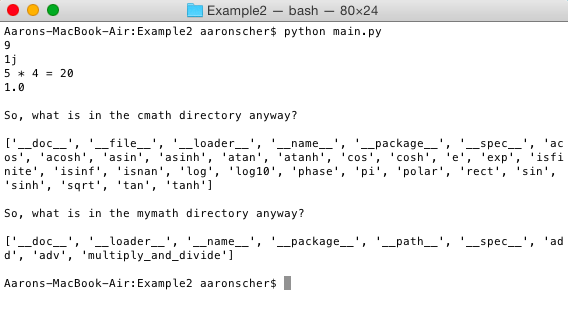 Running Python script from Terminal (Note: working directory in Terminal is the Example2 folder where main.py lives)